
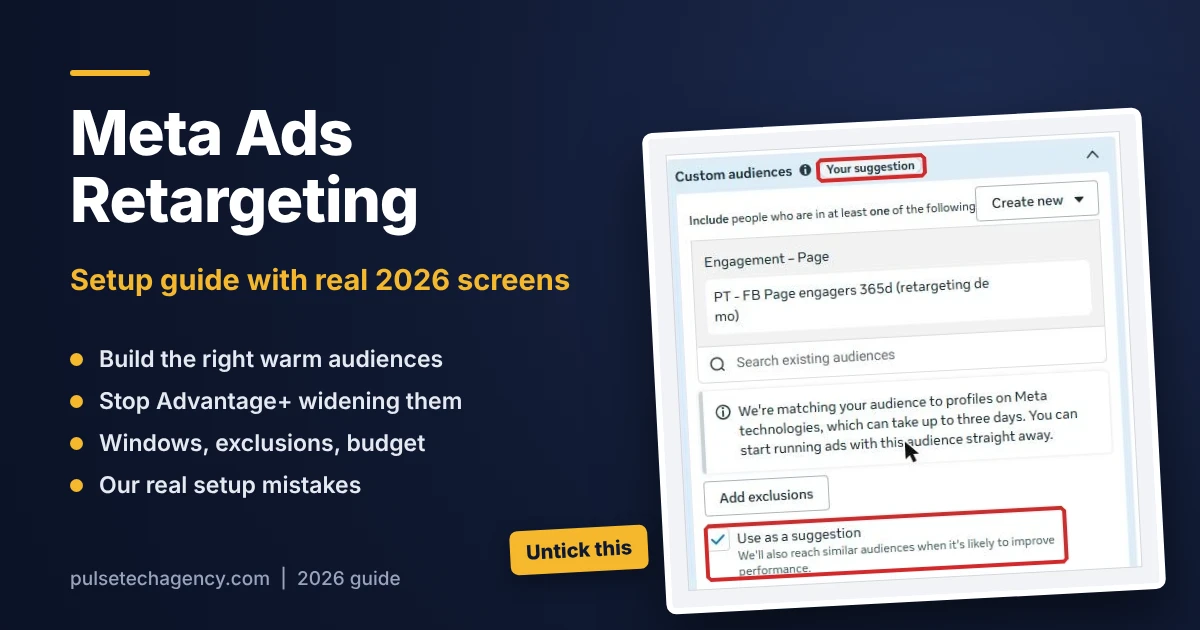
Meta ads retargeting means showing Facebook and Instagram ads to people who already know you: website visitors, Page and Instagram engagers, people who messaged you, or your customer list. Setting it up takes about 20 minutes. Making it actually retarget is the part most guides skip.
Here’s what we found when we built a retargeting audience and draft ad set in our own Pulse Tech ad account on 26 November 2026. Meta’s ad set screen now treats your custom audience as a suggestion by default. It will also reach people beyond any custom audience you add “when it’s likely to improve performance.” So your retargeting ad set can quietly turn into a cold campaign.
Written by Iqra Sabir, Founder & CEO of Pulse Tech Agency. Last updated: 26 November 2026.
This guide shows the exact screens, the two clicks that fix it, the windows and exclusions we use, and a mistake we made while testing.
What’s in this guide
- What is Meta ads retargeting?
- The 2026 catch: your audience is only a suggestion
- Which retargeting audiences to build first
- How to set up Meta retargeting ads, step by step
- How long should the retargeting window be?
- How big should a retargeting audience be?
- Exclusions that stop wasted spend
- What to show each warm audience
- Mistakes we made (so you don’t have to)
- Need help setting it up?
- Frequently asked questions
What is Meta ads retargeting?
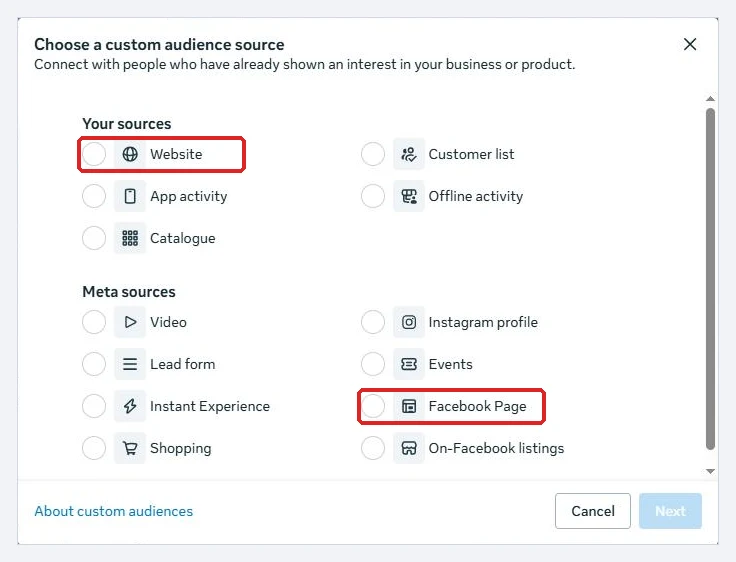
Retargeting on Meta is an ad set that targets a custom audience: a group of people who have already interacted with your business. Meta builds these groups from three kinds of data.
| Source | What it captures | What you need |
|---|---|---|
| Website | Page views, add to cart, leads, purchases | Meta Pixel (plus Conversions API if you can) on your site |
| Meta sources | Facebook Page, Instagram profile, video viewers, lead forms, people who messaged you | Nothing extra. Meta already has this data |
| Your sources | Customer list, offline activity, app activity, catalogue | A CSV of phone numbers or emails, or an app/catalogue connection |
Why bother? Because these people already did part of the work. They visited your pricing page, watched half your Reel or sent “price?” on WhatsApp, then went quiet.
Retargeting gives that person a second, better-aimed reason to come back.
The 2026 catch: your audience is only a suggestion
This is the bit that changed, and it’s why we wrote this guide.
When you create a new campaign today, Advantage+ audience is on by default. Your ad set’s Audience section is split into two parts:
- Controls. Meta’s own wording: “We won’t reach people beyond these settings, even with Advantage+ on.” Controls are locations, minimum age, languages and excluded custom audiences.
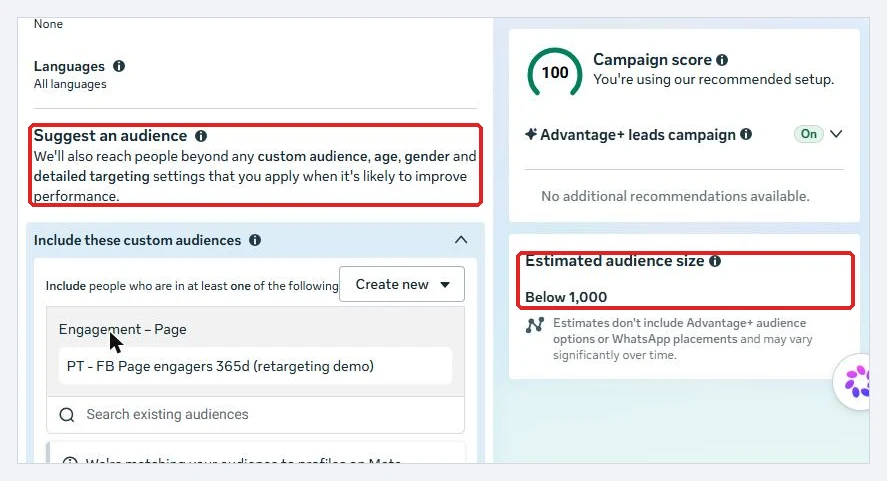
- Suggest an audience. Meta’s wording here: “We’ll also reach people beyond any custom audience, age, gender and detailed targeting settings that you apply when it’s likely to improve performance.”
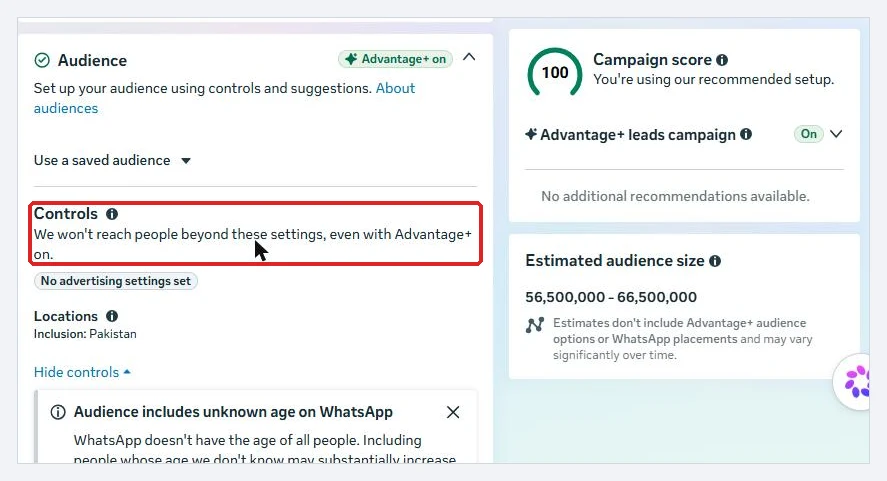
So if you add “website visitors, 30 days” under Include these custom audiences and hit publish, Meta treats it as a starting point. Once it decides that broader delivery will perform better, the ad also goes to people who’ve never heard of you.
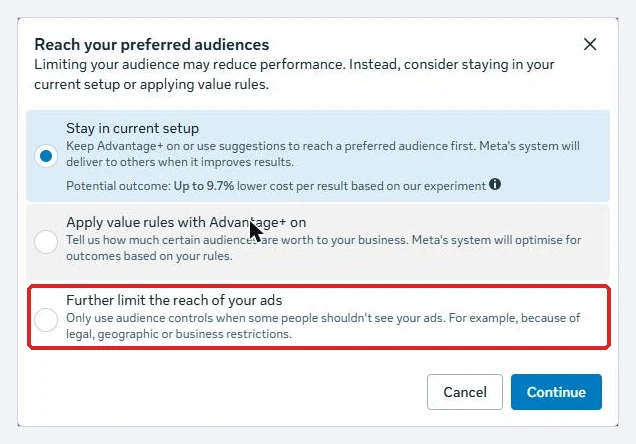
Is that always bad? No. Meta’s own dialog says staying in this setup can bring “up to 9.7% lower cost per result based on our experiment.” If you just want cheaper leads and don’t care who they come from, that’s a fair choice.
But if you want a real retargeting ad set, where only warm people see a “you looked at this, here’s 10% off” message, you have to switch it off yourself. Our test showed it takes two separate clicks. Step 5 below covers both.
One thing doesn’t change with Advantage+: exclusions are hard rules. Meta’s developer documentation lists custom audience exclusions as a constraint that isn’t expanded. You can always keep buyers out.
Which retargeting audiences to build first
Don’t build fifteen audiences on day one. Most small accounts in Pakistan don’t have the traffic to fill them. We start with three to five, ordered by how close the person was to buying.
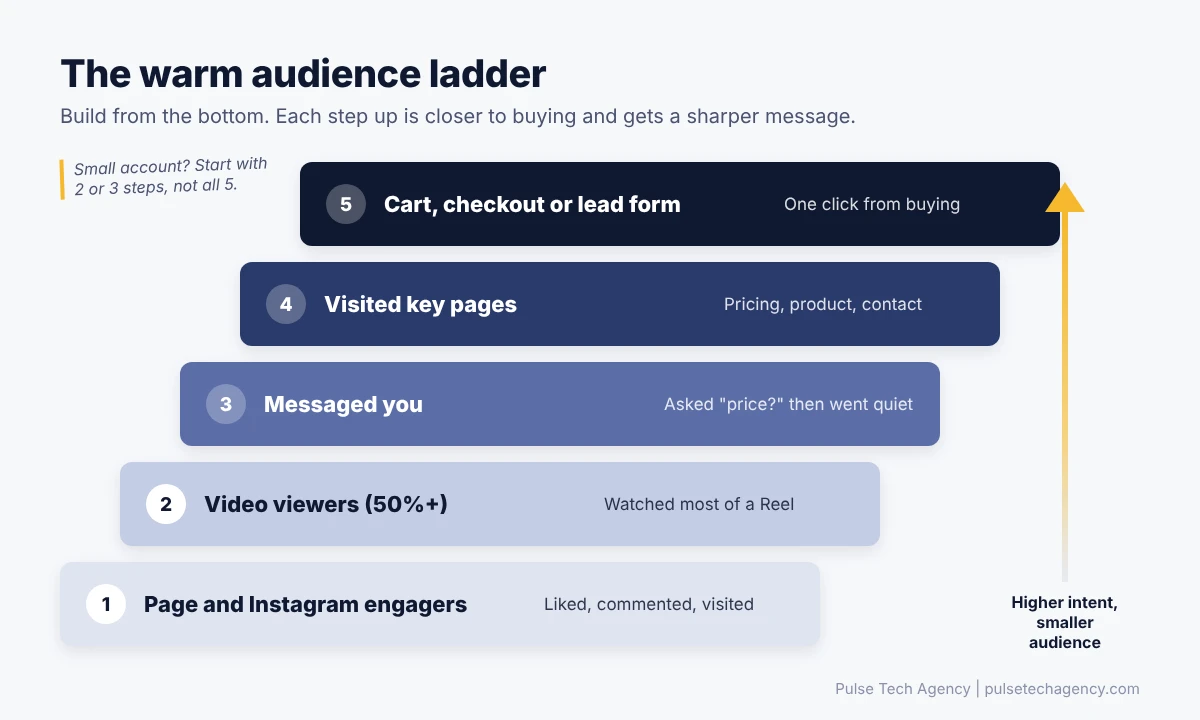
| Audience | Source in Ads Manager | Longest window we confirmed | Good for |
|---|---|---|---|
| Sent a message to your Page | Facebook Page | 365 days (Ads Manager tooltip) | Service businesses that sell in chat |
| Engaged with your Page | Facebook Page | 365 days (Ads Manager tooltip) | New brands with little website traffic |
| Engaged with your Instagram or watched a video | Instagram profile / Video | Check the (i) tooltip when you build it | Warming people up before an offer |
| Visited key pages (pricing, product, contact) | Website | 180 days (Meta developer docs) | Anyone with a working Pixel |
| Added to cart or started checkout, no purchase | Website | 180 days (Meta developer docs) | Online stores |
| Customer list | Customer list | Stays until you update the file | Repeat orders, and excluding buyers |
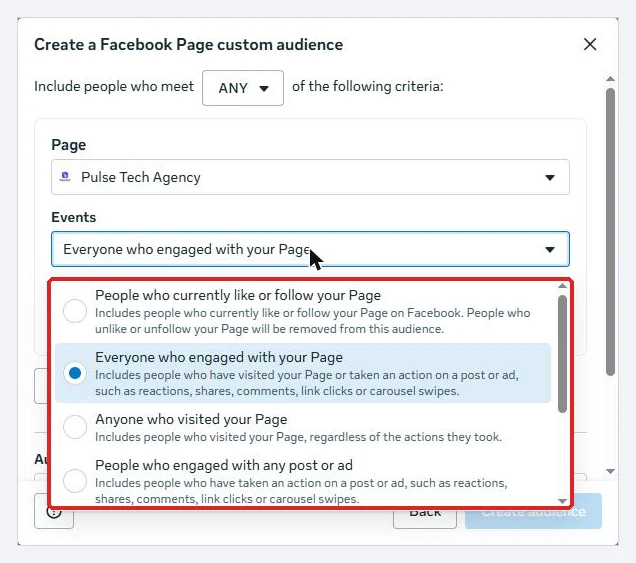
The Page option gives you seven choices on the screen we tested, including “People who sent a message to your Page” and “People who saved any post.” For a Pakistani clinic, academy or property dealer that sells over WhatsApp and Messenger, the message audience is often the warmest list you’ll ever have, and it needs no Pixel at all.
How to set up Meta retargeting ads, step by step
Here’s the order we follow. Each step has the screen we saw on 26 November 2026.
Step 1: Check your Pixel is connected to this ad account
Go to Audiences, then Create Audience, then Custom Audience, then Website.
If Meta shows “Track website conversions using pixel” with a box for a new pixel name, stop. That means no pixel is connected to this ad account yet. Meta is offering to create a fresh one.
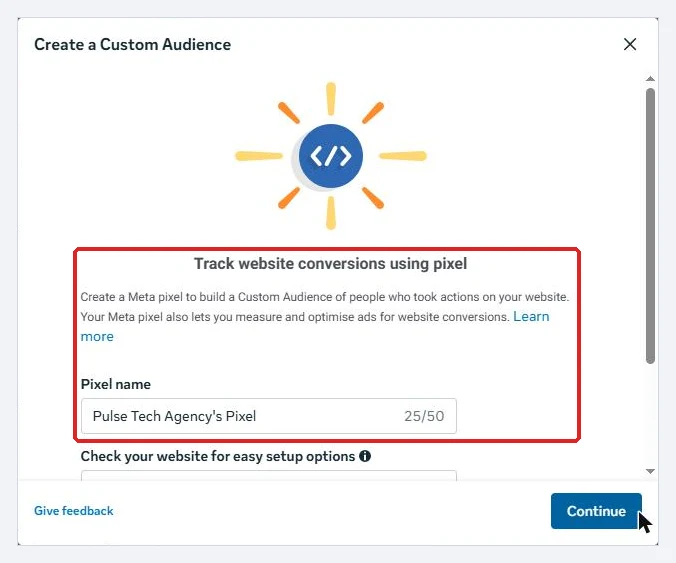
That happened to us. Our Pixel already exists and fires on pulsetechagency.com (we set it up in our Meta Pixel setup guide), but it wasn’t connected to the ad account we tested in. Creating a second pixel would have split our data across two IDs. The fix is to connect the existing pixel to the ad account from Business settings, then come back.
Step 2: Create the audience
Pick the source, choose the event, set the retention days and name it clearly. We name ours by source and window, like FB Page engagers 365d. Six months later you’ll know what it is without opening it.
Meta says matching your audience to profiles “can take up to three days,” but you can start running ads with it straight away.
Step 3: Open the audience again and read the “Time frame” line
Don’t skip this. We typed 365 days for a Page engagement audience. The box showed 365. The tooltip said “Maximum time: 365 days.”
The saved audience said: Time frame: In the past 180 days.
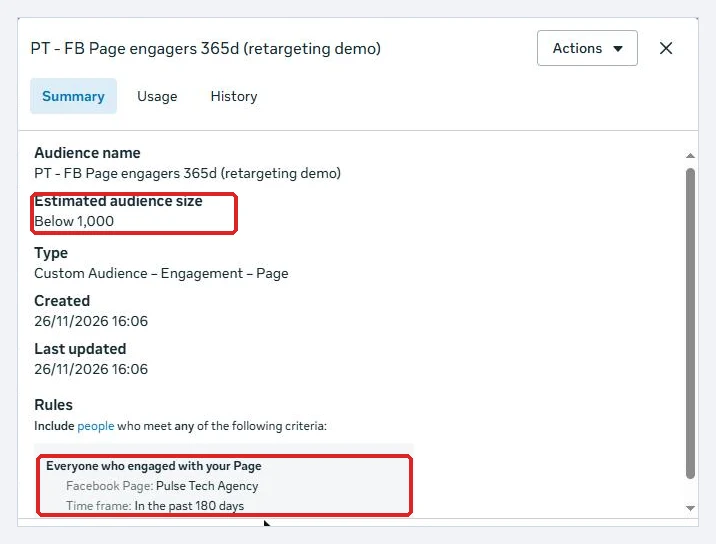
We edited it, typed 365 again, clicked Update, and it still saved as 180. We can’t tell you why. What we can tell you is to check the rule after every save, because your audience may be half the size you planned.
Step 4: Create the campaign and pick the right objective
Choose the objective that matches the action you want from warm people: Leads, Sales, or Engagement for messages. You won’t find a “retargeting” objective in the list. The retargeting happens later, in the ad set’s audience.
Step 5: Lock the audience (two clicks)
In the ad set’s Audience section:
- Click Further limit the reach of your ads and choose that option in the dialog. Meta switches Advantage+ audience off for this ad set.
- Under Custom audiences, untick “Use as a suggestion.” It was ticked by default when we did this. Until you untick it, Meta still treats the audience as “Your suggestion.”
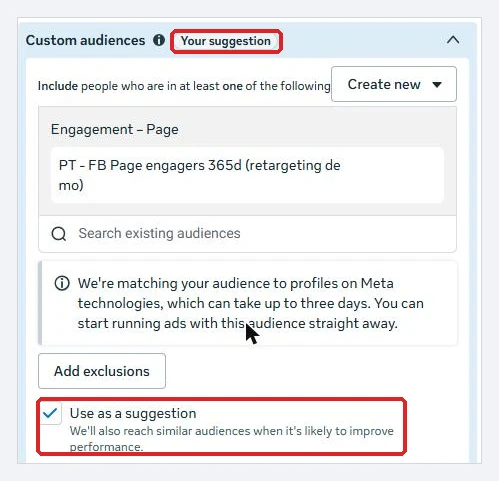
Miss the second click and you’ve done half the job.
Step 6: Add exclusions
Click Add exclusions and remove people who’ve already done the thing you’re asking for: buyers, people who submitted a lead form, or existing clients from your customer list. More on this below.
Step 7: Check the size warning, then set the budget
As soon as we locked our small Page audience, Meta showed “Your estimated audience size is too small” with the size “Below 1,000” and a nudge to use Advantage+ audience.
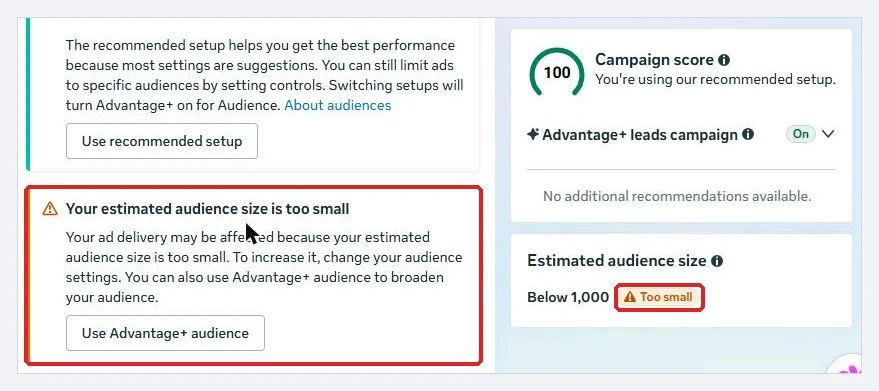
For budget, Meta’s help centre suggests a daily budget of at least 10 times your cost per result. Its learning phase also needs around 50 optimisation events in a week to stabilise. A tiny warm audience rarely produces 50 purchases a week. So for small pools we optimise for a softer event, like messages or leads, or we run it as one ad set inside a broader campaign.
How long should the retargeting window be?
Shorter windows mean hotter people and smaller audiences. Longer windows mean more people and weaker intent. We stagger them so each group gets a different message.
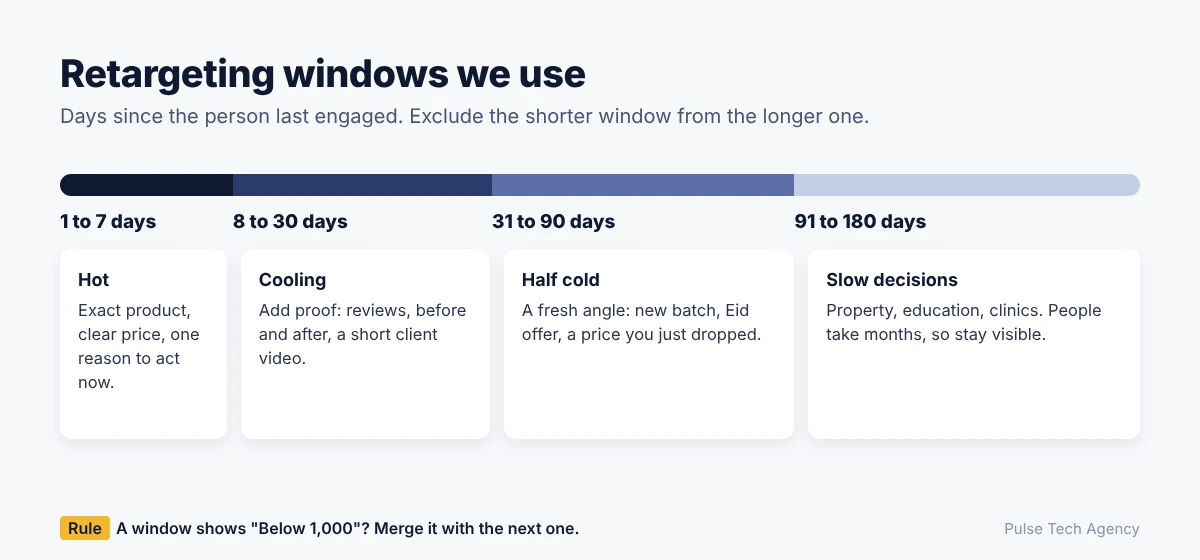
- 1 to 7 days. They were just here. Show the exact product or service, a clear price and one reason to act now.
- 8 to 30 days. Interest is cooling. Add proof: reviews, before/after, a short client video.
- 31 to 90 days. Treat them as half cold. A plain reminder won’t move them now. A fresh angle might: the new admission batch, the Eid offer, the price you just dropped.
- 91 to 180 days. Mainly useful for higher-ticket buys (property, education, clinics) where people take months to decide.
To build staggered windows, create a 30-day audience and exclude the 7-day one from it. Then nobody gets two messages at once.
Our rule for small Pakistani accounts: if a window is “Below 1,000,” merge it with the next one. Two tiny ad sets compete for the same people and neither leaves learning.
How big should a retargeting audience be?
Big enough that Meta doesn’t flag it. In our test, an audience estimated “Below 1,000” got the “too small” warning the moment we turned off expansion.
If yours is that small, you have four honest options:
- Use a longer window (30 to 90 or 180 days).
- Add several warm audiences to the same ad set, say website visitors plus Page engagers plus video viewers. The ad set screen says it includes “people who are in at least one of the following,” so the pools add up.
- Keep the audience as a suggestion and let Advantage+ expand. You give up control and gain delivery.
- Spend on reach first. A retargeting list grows only as fast as your cold campaigns and organic posts feed it.
Exclusions that stop wasted spend
Exclusions do two jobs. They stop you paying to show “complete your order” to someone who already ordered. They also stop your own ad sets bidding against each other for the same person.
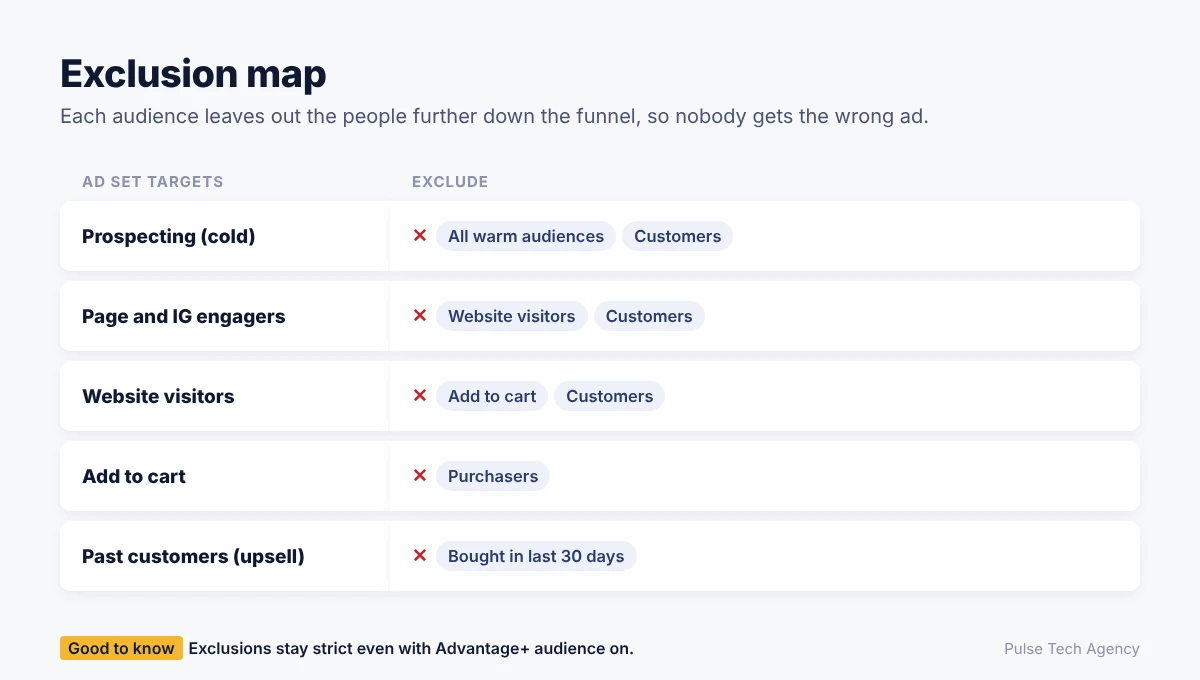
The pattern we use:
- Every prospecting ad set excludes all warm audiences, if you want new people only.
- Page engagers exclude website visitors (they’ll get the website message instead).
- Website visitors exclude add-to-cart.
- Add-to-cart excludes purchasers.
- Everything excludes customers from the last 30 to 90 days, unless the ad is an upsell.
Remember the difference from the previous section: included audiences can be suggestions, but exclusions are always respected.
What to show each warm audience
The person changes, so the ad should too. The examples below are illustrations, not real client ads.
| Audience | What they need | Example angle (illustration) |
|---|---|---|
| Page or Instagram engagers | A reason to trust you | Short client video, “how we work” carousel |
| Messaged you but didn’t buy | An answer to the question they didn’t ask | “Most people ask about delivery time. Here’s ours.” |
| Viewed a product or service page | That exact thing, made easy | Product ad with price, COD or easy payment, WhatsApp button |
| Added to cart | A nudge | Free delivery today, or a reminder with stock left |
| Past customers | Something new | Refill, upgrade, referral offer |
For Pakistani audiences, two details often matter more than the offer. Say whether cash on delivery is available. And give a WhatsApp button, because many warm people would rather chat than fill a form. Our Click-to-WhatsApp ads guide covers that setup.
If you sell products, dynamic ads (Meta calls them Advantage+ catalogue ads) show each person the exact items they viewed. That needs a catalogue, which our upcoming catalogue guide covers.
Watch frequency too. Warm audiences are small, so the same people see your ads again and again. When frequency climbs and the cost per result rises with it, rotate the creative. Don’t just raise the budget.
Mistakes we made (so you don’t have to)
We’d rather show you our errors than pretend the setup is smooth.
- We almost created a second pixel. The Website option offered a new pixel because ours wasn’t connected to that ad account (Step 1).
- Our 365-day audience saved as 180 days. Twice. We only caught it by reopening the audience (Step 3).
- We assumed “Further limit” was enough. It wasn’t. “Use as a suggestion” was still ticked underneath (Step 5).
- Our first audience was too small to run strictly. Meta flagged it the moment we locked it. On a young Page we’d add website visitors and video viewers to the same ad set before spending a rupee.
Need help setting it up?
If you’d rather have someone build and watch it, our team runs Facebook and Instagram ads for businesses in Rawalpindi, Islamabad and across Pakistan. For the full picture of how Meta campaigns fit together, start with our Meta Ads guide. If you’re still deciding on spend, see Facebook ads cost in Pakistan.
Frequently asked questions
What is retargeting in Meta ads?
Ads aimed at people who’ve already met your business somewhere. Maybe they opened your site, liked a post, sent a WhatsApp message or bought last Ramadan. You save that group as a custom audience in Ads Manager, then choose it inside an ad set.
Do I need the Meta Pixel for retargeting?
Only for website audiences. Page, Instagram, video, lead form and message audiences use data Meta already has. Customer lists use your own file. If you want to retarget site visitors, the Pixel must be installed and connected to the ad account you’re using.
How long should a retargeting window be?
Start with 7 days for hot intent and 30 days for warm intent, and exclude the 7-day group from the 30-day one. Use 90 to 180 days for slow decisions like property or education. Website audiences go up to 180 days, and the Page tooltip we saw said 365.
How big should a retargeting audience be?
Big enough that Meta doesn’t show the “too small” warning. Ours showed it at “Below 1,000.” If yours is that small, lengthen the window, combine sources, or keep the audience as an Advantage+ suggestion.
Does Advantage+ audience retarget automatically?
It can reach warm people, but it isn’t limited to them. With Advantage+ on, an included custom audience is a suggestion and Meta may reach others. To retarget only your audience, choose “Further limit the reach of your ads” and untick “Use as a suggestion.”
How much budget does a retargeting campaign need?
Meta suggests a daily budget of at least 10 times your expected cost per result. Warm audiences are small, so spend often stays low. Watch frequency rather than forcing a big budget into a small list.