
“Not delivering” means Meta isn’t showing your ad to anyone right now, so it gets no impressions and spends nothing. Most of the time the fix is in one of nine places, and you can find which one in about ten minutes.
You hit publish last night. This morning Ads Manager says the ad is on, the budget is set, and the reach column still reads zero. Is Meta broken? Usually not. Below is the order we check things at Pulse Tech, with real Ads Manager screens, the exact waiting times Meta gives, and the budget maths in rupees.
Written by Iqra Sabir, Founder & CEO of Pulse Tech Agency. Last updated: 25 November 2026.
What’s in this guide
- What does “not delivering” mean on Facebook ads?
- How long should you wait before you worry?
- 1. Something above the ad is switched off
- 2. The schedule has ended
- 3. The ad is still in review, or it was rejected
- 4. The payment failed
- 5. A spending limit has been reached
- 6. The budget is too small for the goal
- 7. The audience is too narrow, or your ad sets are fighting
- 8. A bid cap or cost goal is set too low
- 9. The post or the Page behind the ad has changed
- Still stuck? A quick checklist
- Frequently asked questions
What does “not delivering” mean on Facebook ads?
It means the campaign, ad set or ad isn’t eligible to run, or can’t win any auctions, so nobody sees it. Ads Manager shows the reason in the Delivery column. Click or hover over the status and Meta often tells you exactly what’s wrong.
Here are the statuses you’ll see most, in Meta’s own meaning (Meta’s status guide):
| Status | What it means | What you do |
|---|---|---|
| In review | Meta is checking the ad against its ad standards | Wait. Most reviews finish within 24 hours |
| Processing | Your recent edit is being applied | Wait a few minutes; some updates take up to 8 hours |
| Preparing | Passed review, Meta is matching it to bids and audience | Wait for the first impression |
| Rejected | The ad breaks an advertising policy | Fix the ad or request a review |
| Scheduled | Set to start on a future date | Check the start date |
| Learning limited | The ad set isn’t getting enough results to finish learning | Widen audience, raise budget or merge ad sets |
| Ads off / Ad set off | A lower level is switched off | Turn it on |
| No ads | The campaign or ad set has no published ad | Publish an ad inside it |
| Completed | The end date has passed | Extend the schedule or duplicate |
One rule saves a lot of time: check the status at all three levels. Your campaign can say Active while the ad underneath says In review.
How long should you wait before you worry?
Meta says to allow up to 24 hours for delivery to start (Meta’s troubleshooting page). If the ad has passed review but nothing is showing yet, the status reads Preparing.
So don’t touch anything for the first day. We know the urge to fix something when the reach column says zero, but every edit you make can send the ad back into review and restart the clock.
If 48 hours pass and none of the fixes below work, Meta’s own advice is to delete the ad and create it again. And if several ads in the same campaign are stuck, contact Meta support rather than rebuilding everything.
For what happens after delivery starts, see how long Facebook ads take to optimize.
1. Something above the ad is switched off
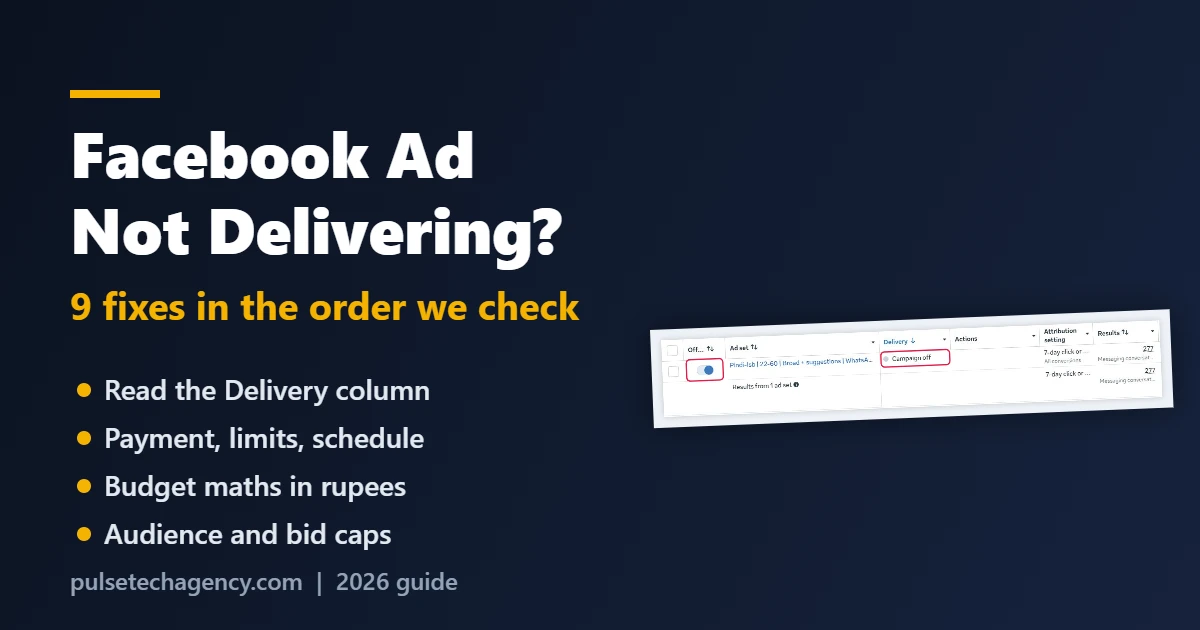
This is the one that fools people. Look at this screen from one of our accounts.

The ad set toggle is blue. On. But Delivery says Campaign off, because the campaign above it is switched off. Nothing under a paused campaign can run, however many ad sets you turn on.
Fix: open the Campaigns tab, find the parent, switch it on. Then check the Ads tab too. Our rule is to read all three tabs before changing a single setting.
2. The schedule has ended
Here’s a campaign whose toggle is on, and yet it’s showing Completed.

A blue toggle only means it’s allowed to run. The end date had passed, so Meta stopped. Compare it with a campaign someone actually switched off: grey toggle, status Off.

Fix: edit the ad set, move the end date forward, and publish. Also look for gaps if you set the ad to run only at certain hours.
3. The ad is still in review, or it was rejected
New ads and edited ads go through review first. Most finish within 24 hours.
If it says Rejected, hover over the status to read the policy reason. Fix the text, image or landing page, then publish again, or request a review if you think Meta got it wrong. Watch for things Meta is strict about: before-and-after photos, health claims, personal questions like “Are you overweight?”, and loan, housing or job ads that skip the special ad category.
4. The payment failed
No payment method, an expired card, or a failed charge will stop every ad in the account at once. Ads Manager often shows a warning banner at the top.
Pakistan adds one more trap. Many local debit cards come with international online payments switched off, and Meta’s charge simply bounces until you turn that option on in your bank app. Turn it on, add the card again under Billing and payments, and pay any balance due.
If the whole account is restricted instead, that’s a different problem. Our guide on a disabled Facebook ad account covers it.
5. A spending limit has been reached
There are three limits people forget they set:
- Account spending limit in Billing and payments.
- Campaign spending limit in the campaign settings.
- Ad set spend limits in the Budget and schedule section.
Hit any one and delivery stops. Did you set one months ago and forget? Most of us have. Lifetime budgets work the same way: once it’s spent, the ad set ends. Raise or remove the limit, and give it about 15 minutes; Meta says changes take up to that long to apply.
6. The budget is too small for the goal
Meta has a simple rule of thumb. Your daily budget should be at least 10 times the cost of the result you’re asking for.
Work it out in rupees. Say a lead form costs you about Rs500 a lead. By Meta’s rule, that ad set wants roughly Rs5,000 a day. Run it on Rs500 a day and Meta may barely spend, because it can’t find a lead at that price.
Two ways out. Raise the budget, or pick a cheaper goal that sits higher up, such as landing page views or WhatsApp conversations. We saw the other side of this with a WhatsApp ad set for a scrap business in Rawalpindi and Islamabad. Rs5,000 lifetime budget. 49 chats on day one. A chat is cheap, so Meta had no trouble finding people to show it to.
Want to know what results cost here? See Facebook ads cost in Pakistan.
7. The audience is too narrow, or your ad sets are fighting
Target “women 25 to 30 in one Rawalpindi sector who like yoga” and Meta might not find enough people to show the ad to. Check the audience size estimate in the ad set. If it’s tiny, widen the age, add more areas, or remove some interests.
The opposite mistake is just as common. Five ad sets with almost the same audience compete in the same auctions, so each one gets less delivery. Meta calls this auction overlap. Merge them into one or two.
Our scrap ad set used the whole of Rawalpindi and Islamabad, ages 22 to 60, with no interests. Delivery was never the problem.
8. A bid cap or cost goal is set too low
If you chose Bid cap or Cost per result goal, check the amount. Set it below what results really cost and Meta won’t win auctions, so it won’t spend.
To test it, switch to Highest volume, wait a few hours, and see if delivery starts. If it does, your cap was the problem, and you can bring a cap back later once you know what a result really costs you.
9. The post or the Page behind the ad has changed
If the ad uses an existing post and someone deleted it, changed its privacy, or the Page lost access, the ad can’t run. Meta shows this as an error, sometimes with Update required.
Fix: create the ad again from a live post, or upload the creative directly in Ads Manager. We prefer the second; your ad then doesn’t depend on a post someone on your team might delete next month.
Still stuck? A quick checklist
Run through these in order. It takes about ten minutes.
- Read the Delivery column at campaign, ad set and ad level.
- Hover over any warning or error and read Meta’s reason.
- Check Billing and payments for a failed charge.
- Check every spending limit and the end date.
- Compare your daily budget with 10 times your cost per result.
- Look at the audience size and overlap.
- Remove bid caps to test.
- If 48 hours pass with no delivery, rebuild the ad.
Prefer to hand it over? Our Facebook ads management service audits stuck accounts and runs campaigns in your own ad account. And for the full picture of how Meta ads work, start with our Meta ads guide.
Frequently asked questions
Why is my Facebook ad active but not delivering?
Check the levels below and above it. A campaign can be on while its ad set is off, or the ad can still be in review. Also check the end date, spending limits and payment.
How long does it take for a Facebook ad to start delivering?
Meta says to allow up to 24 hours. You’ll often see In review, then Preparing, before the first impressions arrive.
Why is my Facebook ad not spending money?
Usually the budget is too small for the goal, a bid cap is too low, or the audience is too narrow. Meta suggests a daily budget of at least 10 times your cost per result.
Why is my Instagram ad not delivering?
Instagram ads run through the same Ads Manager, so the same checks apply. Also make sure your Instagram account is connected to the Page and selected in the ad.
Does editing an ad stop it from delivering?
It can. Edits send the ad back into review and can restart the learning phase, so delivery may pause for a while.
When should I delete and recreate a Facebook ad?
Meta’s advice is to do it if the ad has been published for at least 48 hours and none of the usual fixes work.