
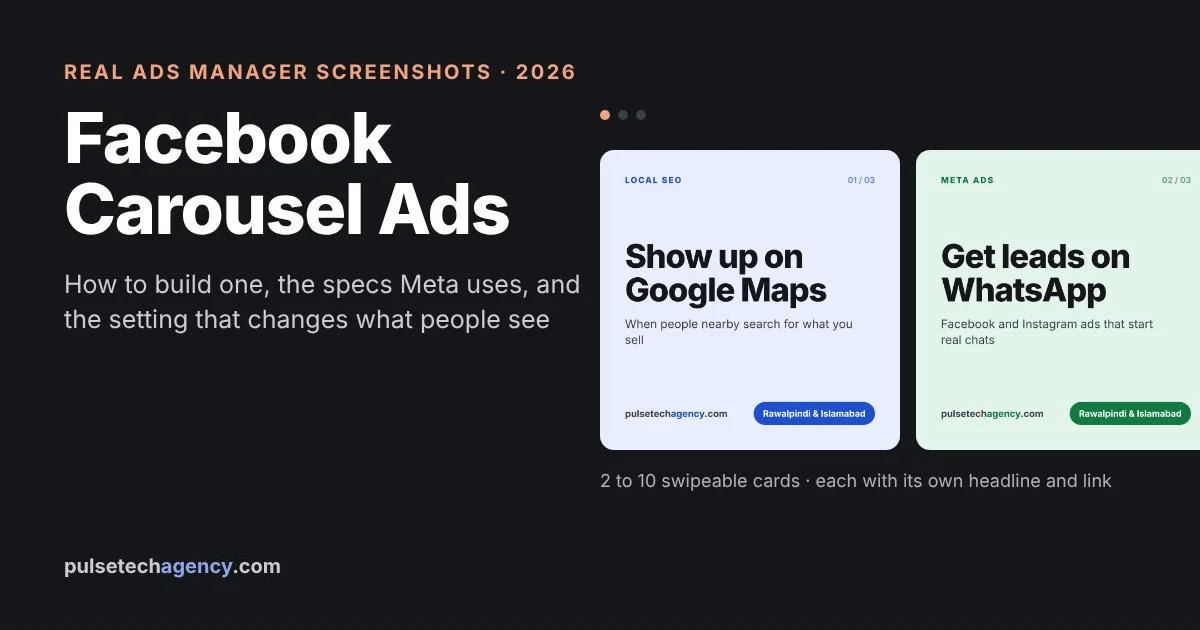
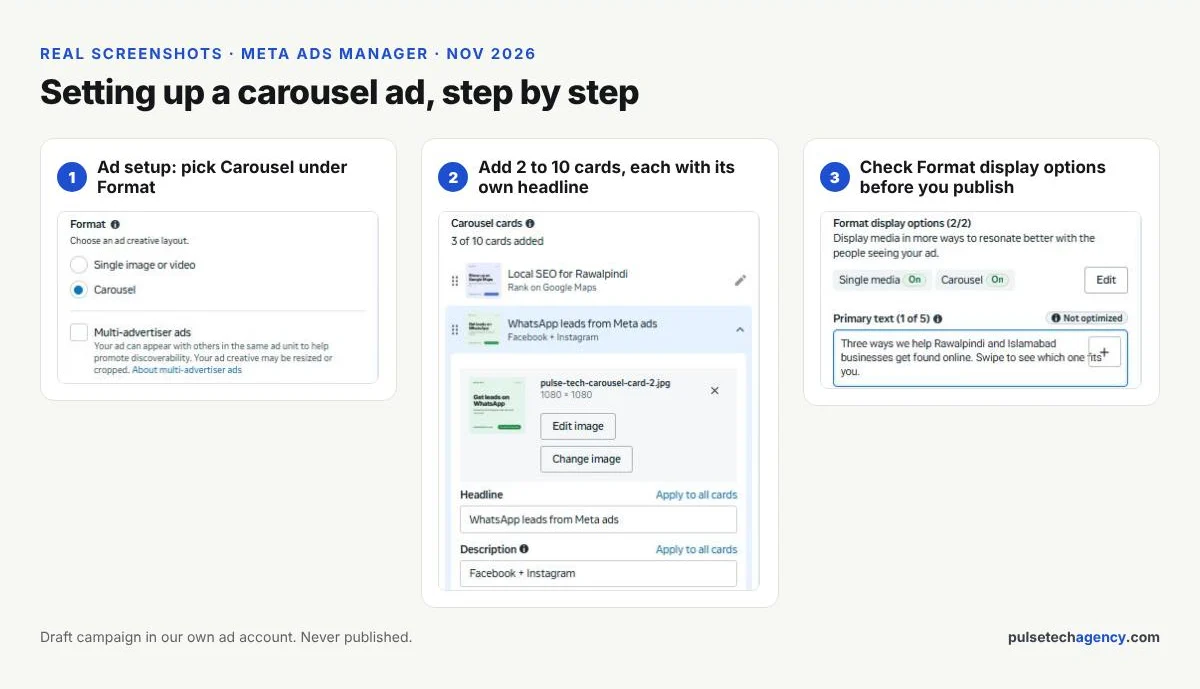
A Facebook carousel ad shows 2 to 10 swipeable images or videos inside one ad, and every card gets its own headline, link and button. To make one, open the ad level in Meta Ads Manager and pick Carousel under Format in the Ad setup section.
That part takes ten seconds. The rest is where most carousels go wrong, so we built a real one in our own ad account while writing this guide and took screenshots at every step. It’s a draft that was never published, and the screenshots are from November 2026.
Written by Iqra Sabir, Founder & CEO of Pulse Tech Agency. Last updated: 22 November 2026.
What’s in this guide
- How to create a carousel ad in Meta Ads Manager
- Facebook carousel ad specs for 2026
- What Meta does to your carousel without asking
- When should you use a carousel ad?
- Facebook carousel ad examples you can adapt
- Tips that change carousel results
- Frequently asked questions
How to create a carousel ad in Meta Ads Manager
Here’s the exact route we took, click by click.
- Create a campaign. Click Create in Ads Manager and choose an objective. Meta’s Ads Guide lists carousel for Awareness, Traffic, Engagement, Leads, App promotion and Sales, so you aren’t locked out of any goal. We picked Traffic and a manual setup.
- Go to the ad level. Skip down past the campaign and ad set screens (or click the ad in the left-hand tree) until you reach Ad setup.
- Pick Carousel under Format. The two choices are “Single image or video” and “Carousel”. Select Carousel.
- Add your cards. In Ad creative, click Add cards and choose image cards or video cards. You need at least 2 and can add up to 10. We uploaded three square images at 1,080 x 1,080 pixels.
- Write a headline and description for each card. Open each card and fill both fields. If you want the same line on every card, the “Apply to all cards” link next to the field copies it across.
- Write the primary text. This is the line above the cards, and every card shares it. Ads Manager lets you add up to five versions (“Primary text 1 of 5”) and tests them for you.
- Pick a call to action and a destination. Website ads need a link on each card. Ours sent people to Messenger, so the button was “Send message”. If you send people to your website, install the Meta Pixel first so Meta can see which card leads to a sale.
- Check Format display options, then preview. More on this below, because it changes what people actually see.
Two small things caught us out while we built the test ad, and they’re easy to miss when you’re working through the form quickly, so here they are.
When the ad’s destination is Messenger, every new card arrives with the headline “Chat on Messenger” already filled in. Leave it as it is and every card in the row carries the same line, which wastes the one spot where each card could say something different.
The other one cost us ten minutes. We typed a new headline into a card, opened the next card, and the first one quietly went back to the old text. What fixed it was pressing Tab (or clicking into another field) after typing, before moving on. Check the collapsed card list afterwards; it shows each card’s saved headline, so you’ll spot a card that didn’t save.
Facebook carousel ad specs for 2026
These numbers come from Meta’s own Ads Guide for carousel ads. The text limits are recommendations rather than hard rules, so Meta won’t reject a longer headline, but anything past the limit tends to get cut off on a phone screen.
| Spec | Facebook Feed |
|---|---|
| Number of cards | 2 to 10 |
| Image ratio | 1:1 or 4:5 (Meta recommends square for carousels) |
| Image size | At least 1,080 x 1,080 pixels |
| File types | JPG or PNG for images; MP4, MOV or GIF for video |
| Maximum file size | 30 MB per image, 4 GB per video |
| Video length | 1 second to 240 minutes |
| Primary text | 80 characters recommended |
| Headline | 45 characters recommended |
| Description | 18 characters recommended |
| Aspect ratio tolerance | 3% |
Instagram Feed follows the same 2 to 10 card rule, but Meta suggests 125 characters of primary text there. If you run on both, write for the shorter Facebook limit and you’re covered.
One practical point about size. Every card in the row should use the same ratio. When one card is square and the next is 4:5, the row looks broken as people swipe, and it’s the first thing a viewer notices.
What Meta does to your carousel without asking
It’s easy to miss, so it gets its own section.
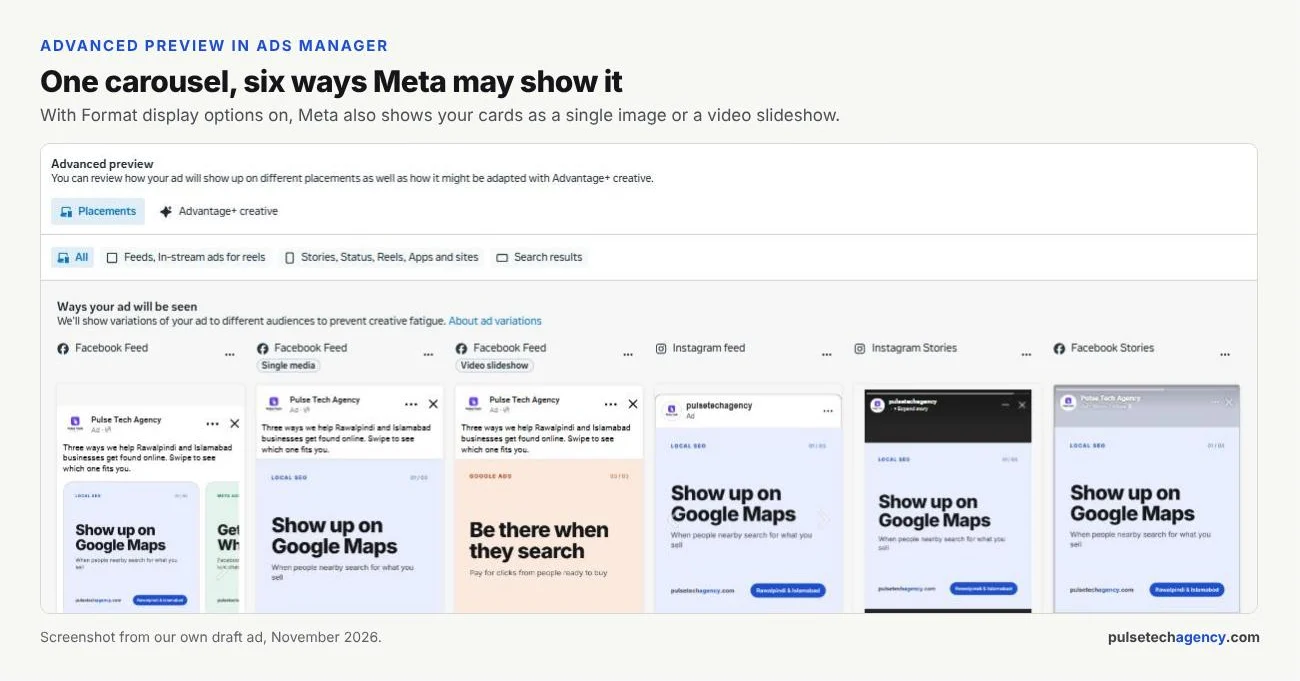
Under the primary text there’s a setting called Format display options. In our draft it showed “Single media: On” and “Carousel: On”, and both were switched on by default. With both on, Meta can show your ad as a normal carousel to some people and as a single image to others. A third group may get a video slideshow built from your cards. The Advanced preview above shows all three versions from the same draft.
For a product range that’s usually fine, since every card stands on its own, but it becomes a problem when your cards only make sense in a fixed order. A three-step story (“problem, fix, result”) falls apart when someone sees card 2 on its own.
There’s a second setting that does something similar. Meta can show your best-performing cards first, reordering cards for each viewer based on how they perform. It works on Facebook Feed, Instagram Feed and Instagram Stories. Meta’s own advice is to turn it off when the carousel tells a story in sequence, and we agree.
So before you publish, open Format display options and decide on purpose. Sequence matters? Switch off single media and the automatic ordering. Separate products? Leave them on and let Meta test.
When should you use a carousel ad?
Use a carousel when you have several things worth showing and each one could earn a click on its own: products, project features, steps or before-and-after shots. If you have one offer and one strong image or video, a single-media ad is simpler and usually just as good.
Some cases where we’d reach for a carousel in Pakistan:
- A clothing brand launching a lawn collection. One card per design, each card linking to that product page, with the price in the description. People shop by swiping anyway.
- A real estate project. Card 1 shows the location and a map pin. The next cards cover the floor plan, the payment plan and the possession date. Buyers want all four before they call, and one image can’t carry that much.
- A restaurant or bakery. A card for each deal or platter, sending people to WhatsApp to order. Keep prices on the images, since a “price?” comment is a click you paid for.
- A clinic or service business. One card per service, which is what our own test ad does with SEO, Meta ads and Google Ads.
And when would we skip it? When the budget is tiny and you’re still testing your offer. A carousel needs more images, more copy and more decisions, and that effort pays off once you know the offer works. Meta doesn’t charge extra for the format. Carousels go through the same auction as every other ad, so the cost comes down to your audience, your bid and how good the ad is.
Facebook carousel ad examples you can adapt
Example 1: our own services carousel (the one in the screenshots).
| Card | Image headline | Card headline | Description |
|---|---|---|---|
| 1 | Show up on Google Maps | Local SEO for Rawalpindi | Rank on Google Maps |
| 2 | Get leads on WhatsApp | WhatsApp leads from Meta ads | Facebook + Instagram |
| 3 | Be there when they search | Google Ads that bring calls | Search + Maps ads |
Primary text: “Three ways we help Rawalpindi and Islamabad businesses get found online. Swipe to see which one fits you.”
Look at the card headlines. Each one is under 30 characters and says what the service is, while the big text on the image says what the customer gets. Doing it that way round means the two lines never repeat each other.
Example 2: a lawn collection (an illustration, not a real client). Five cards, one design each. Image: the outfit on a plain background. Card headline: the design name. Description: the price, for example “Rs 4,990”. Final card: “See all 24 designs”, linking to the collection page.
Example 3: a housing project (also an illustration). Card 1: “5 Marla plots near GT Road”. Card 2: the master plan. Card 3: “3-year installment plan”. Card 4: “Possession in 2027”. Card 5: a photo of the site office with “Book a site visit”. With this one, the order matters, so switch off the automatic card ordering.
Tips that change carousel results
- Card 1 does most of the work. Plenty of people scrolling Facebook Feed never swipe past the first card, so it has to make sense on its own and carry your strongest product or clearest promise.
- Use one design template for every card. Same ratio, same margins, same font. It looks like one ad instead of a pile of uploads.
- Write headlines for scanners. There’s only room for a few words under each card, so a product name or a single benefit works well and a full sentence just gets cut off.
- Give every card a different headline. Ads Manager names cards by their headline in reports, so two cards called “Shop now” are hard to tell apart later.
- Watch the card-level numbers after a week. If card 4 never gets clicks while the others do, swap in a new image for that slot rather than adding a fifth card on top.
- Don’t fight the AI label checkbox. In Ad creative there’s an “Ad includes media created or edited with AI” box. If your images were made with AI tools, tick it. Meta may add an AI info label, which is better than having the ad flagged later.
If you’re still learning how campaigns, ad sets and ads fit together, our complete guide to Meta ads covers the setup. Wondering what a carousel campaign will cost in rupees? Read Facebook ads cost in Pakistan.
Want us to build your carousel ads?
We plan, design and run carousel campaigns for shops, real estate projects, clinics and service businesses across Pakistan. If you’d rather hand it over, have a look at our Facebook and Instagram ads service.
Frequently asked questions
How many cards can a Facebook carousel ad have?
Between 2 and 10. Meta’s Ads Guide sets the same range for Facebook Feed and Instagram Feed. Three to five cards is a sensible starting point for most small businesses, since it gives people a reason to swipe without turning the ad into a long slideshow.
What size should Facebook carousel images be?
Square images at 1,080 x 1,080 pixels or larger. Meta recommends a 1:1 ratio for carousels, and 4:5 is also accepted in Feed. Keep every card at the same ratio.
Can I use videos in a carousel ad?
Yes. When you click Add cards, Ads Manager gives you the choice of image cards or video cards, and a carousel can mix both. Meta accepts MP4, MOV and GIF files up to 4 GB.
Do carousel ads cost more than single-image ads?
Meta doesn’t charge extra for the carousel format. You pay through the same auction as other ads, so your cost depends on your audience, budget, bid and how people react to the ad.
Can each carousel card link to a different page?
Yes. Every card has its own headline, description and link, which is why carousels suit online stores that want each product card to open its own product page.
Can Meta change the order of my carousel cards?
It can, if “show best-performing cards first” is on. Meta then puts the cards people respond to most at the front. Turn it off when your cards tell a story in a fixed order.